myChevrolet
- 4.6
- Rating
- 10.00M
- Installs
- Free
- Price

 Analysis by App-foxy
Owning a Chevrolet often means dealing with small tasks at inconvenient moments: checking whether the vehicle is ready for a trip, remembering maintenance, finding information about the car, or trying to sort out an issue away from home. I spent time with myChevrolet to see whether it genuinely reduces that daily friction or simply places familiar ownership information behind another screen. My overall impression is that it works best as a central ownership companion rather than as an app you open for entertainment or casual browsing.
Developed by General Motors, this free lifestyle app is aimed specifically at Chevrolet owners. It has been available since October 27, 2010, and its current version is 8.3.0. The app is rated for Everyone, so it is approachable for a broad audience, although the useful experience naturally depends on having a compatible Chevrolet vehicle and the right ownership details available to connect it.
Remote vehicle access is the capability that matters most
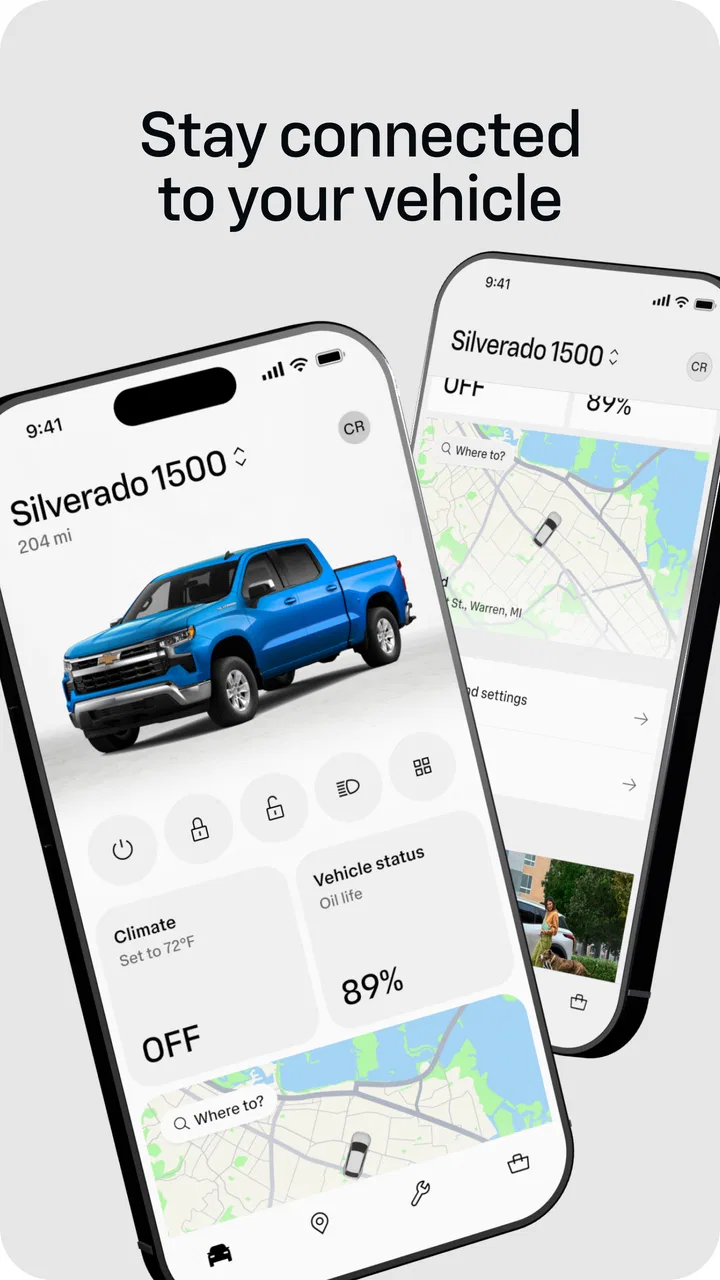
The feature I found most meaningful is the app’s role as a remote connection to the vehicle. Instead of treating the phone as a digital brochure, myChevrolet is designed around the practical relationship between owner and car. That distinction matters. I did not open it because I wanted another way to read general Chevrolet information; I opened it when I wanted to act on something related to my own vehicle.
You May Also Like

 Blood Strike: 2.5 Anniversary
Blood Strike’s Loadouts Turn Every Drop Into a Tactical Gamble
A close look at Blood Strike’s custom loadouts: how fast access to signature weapons reshapes its battle royale rhythm, rewards preparation, and narrows the gap between fights.

 Pandora - Music & Podcasts
Pandora’s Music Is Easy to Start, but Harder to Recover
Pandora’s strength is its low-effort path from a seed to a station. Its weak spot is how much confidence it asks you to place in connection, setup, and quiet recovery.

 8 Ball Pool
 Is Built on Rivalries, Rematches, and Routine
A close look at the rivalries, rematches, shared routines, and unanswered safety questions that turn a quick pool match into a persistent mobile community.

 Samsung Music
’s Quiet Strength Is Playing What You Already Own
Its reach comes less from spectacle than from dependable access to a personal library. That simplicity is both the app’s strongest retention engine and its ceiling.

 AccuWeather: Weather Radar
AccuWeather Review: A Quick, Clear Forecast for Everyday Decisions
For everyday plans, the best forecast is the one you can understand quickly. AccuWeather makes rain timing, radar, and local conditions easy to act on, with a few trade-offs.

 Hill Climb Racing
Why Hill Climb Racing Still Turns Crashes Into One More Run
A tiny car, a bumpy hill and one more upgrade: Hill Climb Racing keeps resurfacing because its simple chaos makes every near-miss feel personal.
More From Our News Desk
View All News


In day-to-day use, that remote connection can make ownership feel less dependent on being physically inside the car. The useful effect is not that it replaces every control or every conversation with a dealer. It is that it gives me a single place to begin when I need to check the vehicle, review ownership information, or deal with a task that would otherwise require walking outside, searching through paperwork, or switching between unrelated services.
The app is most valuable when it shortens the distance between a question and the next sensible action. If I am wondering about the vehicle before leaving, the app gives me an ownership-focused starting point. If I need help with a maintenance-related concern, it keeps that concern connected to the car rather than leaving me to reconstruct the details from memory. That focus is what separates it from a generic automotive app.
There is also a psychological benefit. A car can feel like a separate object with its own information, schedules, and occasional problems. Bringing those details into a familiar phone interface makes the ownership relationship easier to manage. I found that particularly useful during busy days, when the value of an app is less about discovering a new feature and more about removing one small interruption.
What the remote approach changes
Traditional ownership usually involves a mixture of dashboard controls, printed documents, browser searches, phone calls, and memory. Each method can work, but the experience is fragmented. myChevrolet’s advantage is the attempt to gather Chevrolet-specific ownership actions in one place. That does not make every task instant, but it reduces the need to remember where a particular piece of information belongs.
Compared with a general vehicle-maintenance app, this is a more direct fit for someone who drives a Chevrolet and wants the manufacturer’s ownership environment. A third-party app may be better for tracking several makes of car or building a broader maintenance log, but it will not feel as closely tied to one Chevrolet vehicle. That is the central trade-off: specialization is useful when your needs are narrow, but less useful when your household has a mixed collection of vehicles.
How I found the ownership workflow in practice
The first important step is setting up the app around the vehicle rather than treating it like a standalone information service. That makes the experience more personal, but it also means the quality of the result depends on accurate account and vehicle details. I would not rush through setup. Taking a little care at the beginning makes later visits more useful because the app has a clear ownership context.
Once the vehicle is connected, I found the app easier to judge by specific situations than by browsing every screen. The useful question is not “What menus does it have?” but “What problem am I trying to solve right now?” For example, before a long drive, I would use it as a quick ownership check. When thinking about service, I would approach it as a place to organize the next step. When I was away from the car, I valued the fact that the phone could still serve as my first reference point.
The app’s usefulness also depends on communication between the phone, the account, and the vehicle. That is an important practical limitation. A remote command or vehicle-related update is not the same as pressing a physical button beside the steering wheel. It relies on the connected experience working properly, so I would not make it my only plan in a situation where immediate certainty is essential.
That is one of my main tips: use the app to prepare and simplify, but keep ordinary ownership habits in place. I would still carry the normal keys, know how to access essential vehicle information, and avoid assuming that a phone screen is always a substitute for direct confirmation. The app is a helpful layer, not a reason to forget the physical side of owning a car.
A realistic morning example
Imagine a cold weekday morning when I am leaving for work and the Chevrolet is parked outside. Rather than getting dressed, walking out, and discovering that I need to spend extra time preparing the vehicle, I can begin with the ownership app. That small head start is where the remote capability has real value. It turns a last-minute chore into something I can consider while I am still organizing the rest of my morning.
The benefit is modest but genuine. I am not saving an entire afternoon; I am reducing uncertainty at a moment when small delays are annoying. If the vehicle needs attention, I have a better chance of noticing before I am already late. If everything looks fine, I can move on with more confidence. This is the kind of use case where the app earns its place on my phone.
A second useful situation is preparing for a trip when another family member is using the car. Instead of relying entirely on verbal reminders, I can check the ownership information myself and keep the conversation focused on what actually needs to happen. That is especially practical in households where one person drives the Chevrolet most of the time but another person handles scheduling or planning.
Where it helps beyond the driveway
I also see value when the owner is away from home. A vehicle problem is stressful partly because the relevant information is often scattered. Having a Chevrolet-specific app available gives me a familiar place to begin rather than searching randomly for advice. It does not turn a complicated problem into a simple one, but it can make the first response more organized.
For a newer owner, that structure can be reassuring. Someone who has just started managing a vehicle may not know which details matter when arranging service or checking ownership information. The app can encourage a more deliberate routine: identify the vehicle, review the relevant information, and then decide whether the next step belongs in the app, with a service professional, or in the vehicle itself.
For an experienced owner, the benefit is different. I would not expect the app to teach me everything about driving or maintenance. Instead, I would use it to reduce repetition. The more familiar I am with the car, the more I appreciate tools that save me from digging through old messages or remembering where I stored a document.
The trade-offs I would consider before installing it
The biggest limitation is that myChevrolet is not a universal car-management tool. Its strongest reason to exist is its connection to Chevrolet ownership. If I regularly manage vehicles from several manufacturers, I may prefer a broader app that keeps all cars in one system, even if that means losing some manufacturer-specific convenience.
There is another trade-off between convenience and dependence. A connected vehicle app can make routine tasks easier, but it also introduces another account and another digital point of failure. If I change phones, lose access to my account, or encounter a connection problem, I do not want to be stranded because I treated the app as the only way to interact with the car. That is not a criticism unique to this product, but it is worth keeping in mind before building a routine around remote access.
I also think expectations need to be realistic. An app cannot remove the cost, time, or physical work involved in vehicle ownership. It can organize the experience and make certain steps more convenient, but it cannot replace a qualified technician, a physical inspection, or the vehicle’s own controls. I would recommend it as a companion to ownership, not as a complete substitute for every other resource.
Another point is attention. A phone-based control surface can be convenient, but it should not encourage interaction while driving. I would handle anything that requires concentration before setting off or after parking. The app’s best role is preparation and organization, not giving me another reason to look at a screen on the road.
Finally, the experience may feel unnecessary to owners who already have a simple routine and rarely need remote access or centralized vehicle information. If I only use my Chevrolet for short, predictable trips and prefer physical controls and paper records, I may not notice enough daily benefit to justify adding another app. That is a fair conclusion; convenience is personal, and not every owner needs the same level of connection.
How it compares with ordinary alternatives
The usual alternative is not always another app. Often it is the vehicle key, the dashboard, a glove-box manual, a calendar reminder, or a phone call. Those tools remain dependable in their own ways. The key is immediate and does not require a screen. The dashboard is physically connected to the vehicle. A calendar can remind me about a planned task without being tied to one manufacturer.
myChevrolet sits between those options. It is more vehicle-specific than a calendar and more organized than a collection of notes, but it is less direct than being beside the car. That makes it strongest for planning, checking, and beginning an ownership task. It is less compelling when I need an instant physical response or when I am trying to manage several unrelated vehicles in one place.
Compared with a generic automotive utility, I would choose this app when the Chevrolet connection matters more than cross-brand flexibility. Compared with using only the car itself, I would choose it when I want to prepare before reaching the vehicle. The right choice depends on whether my priority is manufacturer-specific convenience or a single universal dashboard for everything I drive.
Who will get the most from myChevrolet?
I think the best audience is a Chevrolet owner who wants less friction around ordinary ownership. That includes people who appreciate checking vehicle-related information from a phone, families sharing responsibility for one car, and drivers who often prepare for trips before heading outside. The app is also a sensible starting point for owners who find vehicle paperwork and service planning harder to keep organized than they should be.
It is free, which makes trying it relatively easy, and the broad Everyone rating means it is not presented as a niche tool for a narrow age group. Its scale also suggests that it has found a substantial audience: the app has more than five million installs, with an average rating of 4.6 from roughly 296 thousand ratings and about 45 thousand written reviews. Those figures do not guarantee that every connected-vehicle experience will be smooth, but they do show that this is an established ownership app rather than an obscure experiment.
I would be more cautious if I drove multiple brands, disliked account-based services, or wanted a detailed maintenance system that works independently of a manufacturer. In those cases, a general vehicle-management solution may fit better. I would also skip it if I expected the phone to replace keys, service professionals, or direct vehicle checks. That expectation would set the app up to disappoint.
For me, the deciding question is simple: do I want my Chevrolet to be easier to manage when I am not standing next to it? If the answer is yes, myChevrolet has a clear purpose. Its remote ownership capability turns a few scattered tasks into a more coherent routine, especially during busy mornings and trip preparation. It is not magic, and it does not eliminate the responsibilities of owning a car, but it can make those responsibilities feel more manageable.
After using it, I see myChevrolet as a practical companion for owners who value preparation and manufacturer-specific access. The app’s strongest quality is not that it tries to do everything; it is that it keeps attention on the Chevrolet already in my life. For the right owner, that focused approach is exactly what makes it worth installing.
FAQs for myChevrolet
01What features does the myChevrolet app offer?
The myChevrolet app provides a comprehensive suite of features designed to enhance your driving experience. Key features include remote start, vehicle diagnostics, maintenance reminders, and real-time vehicle status updates. Additionally, it offers navigation assistance and the ability to schedule service appointments directly from the app, making vehicle management seamless and convenient.
02Is the myChevrolet app compatible with all Chevrolet models?
The myChevrolet app is compatible with most Chevrolet models, but features may vary depending on the model and year of your vehicle. It's important to check the app's compatibility with your specific vehicle to ensure you can access all available features. Compatibility details can be found on the app's download page or by contacting Chevrolet support.
03How secure is the myChevrolet app?
The myChevrolet app prioritizes user security by employing advanced encryption methods and secure login protocols. Your data is protected, and features like remote start are designed with multiple security layers to prevent unauthorized access. Always ensure you use a strong password and enable any additional security features offered by the app.
04Can I use the myChevrolet app without an internet connection?
An internet connection is required for most features of the myChevrolet app, such as remote commands and real-time updates. However, some basic information may be accessible offline. For optimal performance and full feature access, ensure your device is connected to the internet when using the app.
05Does the myChevrolet app require a subscription?
The myChevrolet app itself is free to download, but some features may require a subscription to Chevrolet's connected services. These services offer enhanced functionalities like advanced diagnostics and remote access features. Subscription plans and pricing details can be found within the app or by visiting Chevrolet’s official website.
Pros
- User-friendly interface for easy navigation.
- Comprehensive vehicle health monitoring.
- Remote start and lock features included.
- In-app maintenance reminders.
- Access to owner's manual and tips.
Cons
- Limited functionality for older models.
- Requires strong internet connection.
- Occasional app crashes reported.
- Some features need OnStar subscription.
- Battery drain may increase with use.

myChevrolet
Gallery